
Quick facts
Main use
Solana token dashboard
This guide supports builders who already created an SPL token and need a practical review workflow before the next launch action.
Best timing
After mint, before promotion
Use the dashboard when the token exists but the team still needs to confirm metadata, authorities, supply context, liquidity plans and scanner-visible signals.
Main risk
Wrong next action
A post-creation wallet may hold many tokens. The dashboard helps identify the exact mint before opening metadata, mint, burn, liquidity, vesting or scanner tools.
Launch workflow
Support the Token Control Center
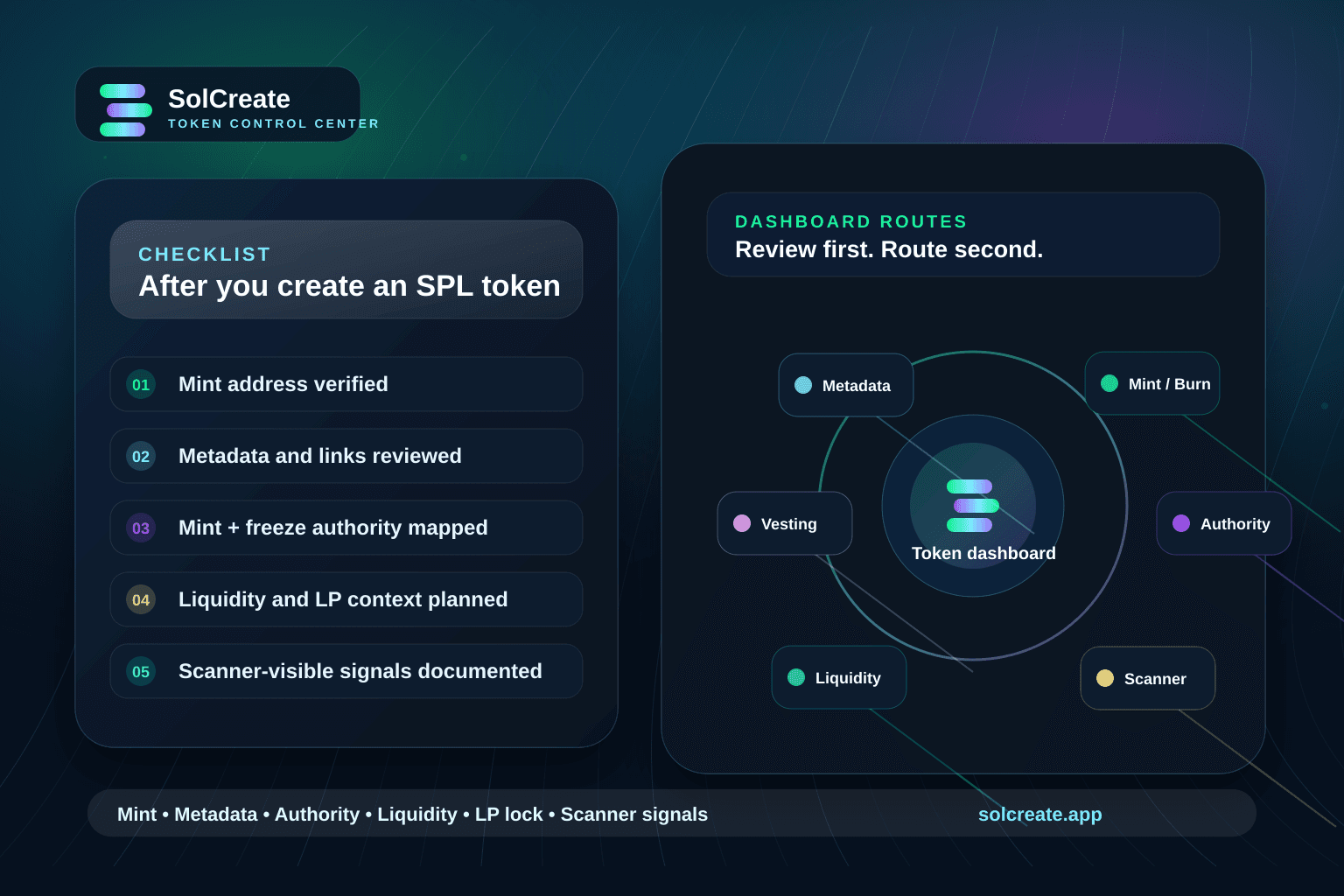
The guide explains the post-creation review workflow and connects builders directly with the Token Control Center.
Why the dashboard step matters after token creation
A no-code creator can make the mint process much simpler, but a serious launch still needs a post-creation review. The token may exist on Solana, yet the team still needs to confirm which wallet controls it, whether supply actions remain possible, whether metadata is ready for public screenshots and whether the next SolCreate tool is the correct one.
That is where a Solana token dashboard becomes useful. It gives creators a structured place to review token inventory before jumping into minting, burning, metadata updates, liquidity preparation, vesting, multisender distribution or scanner checks. The dashboard is not a replacement for wallet confirmation; it is the planning layer before a wallet-confirmed action.
This matters most when a team is moving quickly. A launch wallet can hold devnet tests, abandoned drafts, LP-related assets and the real project token. If the team routes the wrong mint into a tool, the mistake may become visible in public notes or community screenshots. A dashboard-first habit reduces that risk.
Solana token dashboard checklist
Use this checklist any time the SPL token already exists and the next step affects public trust, supply, metadata or liquidity context.
- Save the mint address as the source of truth for public launch notes.
- Open the token dashboard with the operational wallet that controls the SPL token.
- Confirm the token balance and whether the wallet controls more than one relevant asset.
- Review mint authority, freeze authority and metadata authority before any public claim.
- Check whether metadata, logo, website and social links are final enough for wallet screenshots.
- Decide whether the next action is minting, burning, metadata cleanup, liquidity, vesting, multisender distribution, LP lock planning or scanner review.
- Run scanner checks before promotion if buyers or moderators will evaluate the mint address.
- Write a short changelog for the community whenever supply, metadata, liquidity or authority context changes.
What to review before opening another SolCreate tool
The dashboard should answer one practical question: what should happen next? For some teams, the answer is a metadata cleanup before promotion. For others, it is a supply action, a burn, a vesting plan, a multisender distribution, liquidity preparation, an LP-lock explanation or a scanner review before the mint address is shared.
Confirm the exact SPL mint address
Start with the mint address, not only the token name or ticker. Names and symbols can be copied by other projects, while the mint address is the reference users, moderators, explorers and scanner reports can verify.
Review wallet inventory and balances
A launch wallet may contain test tokens, treasury assets, LP tokens, airdrop leftovers and the real project token. A dashboard review helps the team avoid routing the wrong asset into a supply or metadata workflow.
Check mint and freeze authority context
Before public announcements, understand whether mint authority or freeze authority still exists and who controls it. The point is not to make a vague safety claim; it is to explain authority choices clearly.
Validate metadata before screenshots spread
Token name, symbol, logo, description and official links often become the first screenshots a community shares. Review metadata before promotion so wallet displays and public notes tell the same story.
Map the next SolCreate action
After review, route into the exact action: update metadata, mint supply, burn supply, plan vesting, prepare liquidity, lock LP context or run scanner checks. The dashboard should reduce confusion, not hide the wallet-confirmation step.
Document scanner-visible signals
If the token is about to be shared publicly, run a scanner review and write down what users may notice: holder concentration, authority status, liquidity context, shared funder patterns and official links.
How the dashboard connects creation, metadata and scanner review
SolCreate is strongest when the workflow is treated as create, prepare, review and then communicate. The Solana Token Creator handles the first deployment path. The Token Control Center helps the team review the token after it exists. Metadata, mint, burn, vesting, liquidity and scanner routes then become deliberate next steps instead of disconnected tools.
For metadata, the dashboard habit keeps the token identity close to the mint address. That is important because users may judge a token from wallet previews, explorer pages and copied screenshots. If the logo or official link is wrong, the problem should be corrected before the community treats the mint address as final.
For scanner review, the dashboard creates a cleaner handoff. The team can confirm the correct token first, then evaluate public signals such as holder concentration, authority status, liquidity context and shared funding patterns. The goal is not to promise that a token is safe; the goal is to explain what is visible and what still needs context.
Common mistakes to avoid
- Promoting the ticker before the exact mint address and official links are documented.
- Opening a mint or burn tool from memory instead of confirming the token in a dashboard first.
- Treating authority controls as private admin details when public reviewers may ask about them later.
- Updating metadata after screenshots have already spread without explaining what changed.
- Calling a token launch ready before liquidity, LP lock context, vesting and scanner-visible signals have been reviewed.
Recommended post-creation workflow
A practical sequence is simple: create the SPL token, save the mint address, review it in the dashboard, clean up metadata, decide authority policy, plan liquidity or vesting, run scanner checks and then publish a clear launch note. Each step should leave a short record that moderators, founders and community members can understand later.
This workflow is especially useful for beginner teams because it separates technical completion from launch readiness. A token can be created and still need better metadata, clearer wallet roles, liquidity context, vesting documentation or scanner review before it should be promoted widely.
FAQ
What is a Solana token dashboard used for?
A Solana token dashboard helps teams review SPL token inventory, mint addresses, balances, authority context and available post-creation actions before opening a wallet-confirmed tool.
Should I use the dashboard before minting more supply?
Yes. Confirm the exact token, current balance, mint authority context and communication plan before minting more supply so the action is deliberate and easier to explain.
Does a token dashboard replace a risk scanner?
No. The dashboard helps choose the token and route the next action. A scanner review explains public risk signals such as holder concentration, authority status, shared funders and liquidity context.
Can SolCreate execute transactions from the dashboard?
The Token Control Center is a review and routing layer. It opens the matching SolCreate tool with context, while each metadata, mint, burn, liquidity or scanner action stays in its own wallet-confirmed flow.
When should a team review token metadata?
Review metadata before promotion, before exchange or community screenshots spread, and before any public launch note that depends on the token name, symbol, logo, website or social links.