 SolCreate
SUI Token Creator
SUI Token Creator for Move-native coin launches
Create your own Move-native coin on Sui with SolCreate. Set the coin name, symbol, decimals, supply and authority choice in a guided wallet flow without writing Move code manually or building a package from scratch.
Transparent SolCreate fee
SUI Token Creator pricing is visible before wallet confirmation
SolCreate is built for affordable token launches: the SUI Token Creator uses a fixed 3.2 SUI SolCreate fee, shown before the wallet step, while SUI gas and package-publish costs stays separate so builders can budget clearly before signing.
The wallet can still show normal network costs, liquidity costs or optional post-launch tool costs separately.
SolCreate fee
3.2 SUI
network gas stays separate
3.2 SUI
SolCreate fee
Fixed, visible product fee. SUI gas and package-publish costs stays separate in the wallet.
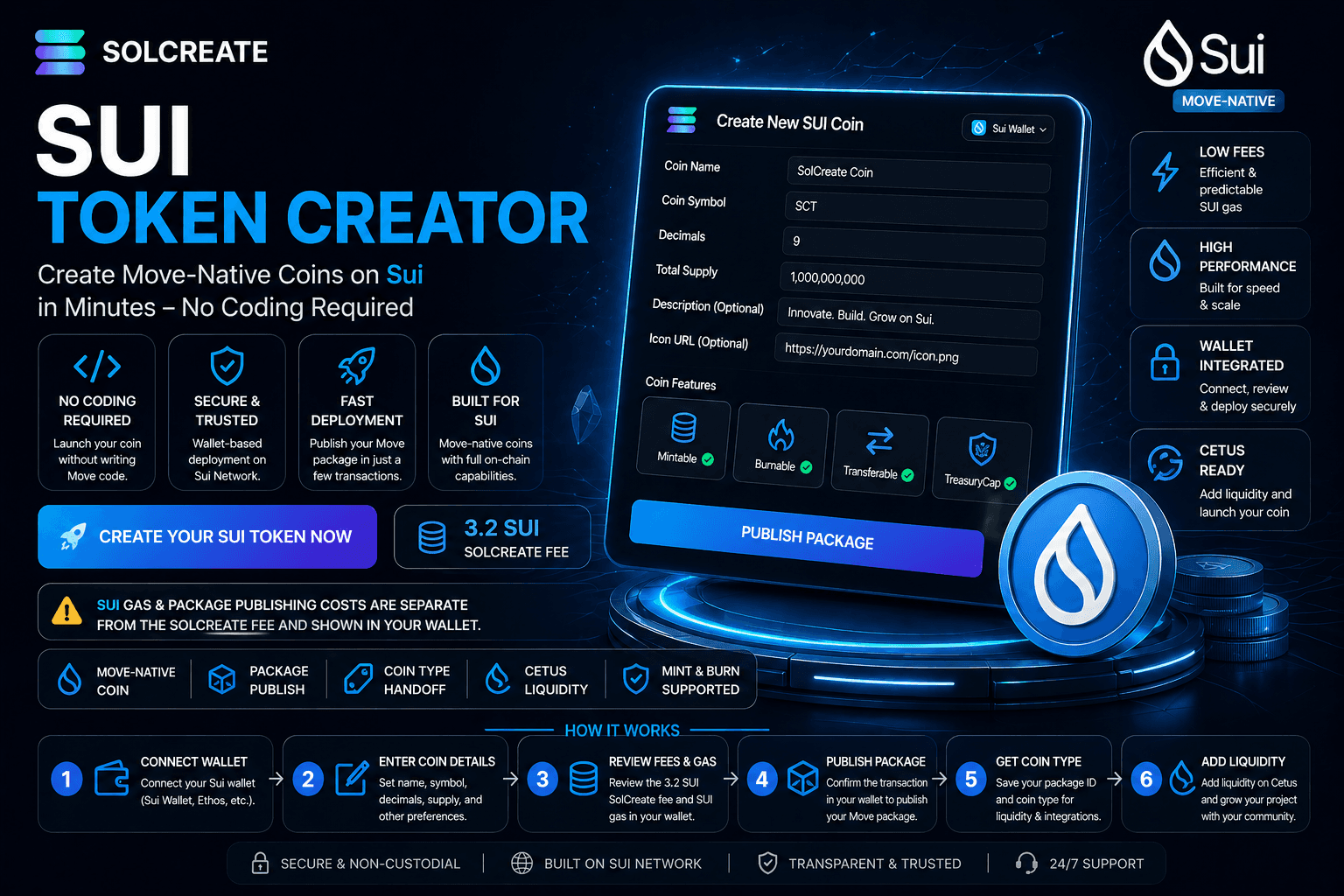
Move-native coin launch
Sui token creation uses Move packages, coin types, objects and capabilities. SolCreate explains the flow in SUI-native language.
SolCreate fee: 3.2 SUI
The SolCreate fee is fixed. SUI gas, package publishing costs and Cetus liquidity costs are separate and shown through the wallet or next-step tools.
Coin type handoff
After publish, SolCreate keeps the package ID and coin type visible so users can continue into Cetus liquidity, minting or burning.
Create a SUI token without coding
A lot of users search for a SUI token, but Sui uses a Move-native coin model instead of the ERC-20 contract model used on EVM chains. SolCreate turns that technical structure into a guided launch flow.
Instead of writing Move modules and managing package publishing manually, you enter the launch settings and confirm the transaction in your wallet. For technical background, see the official Sui Coin Standard documentation.
Built for SUI launch teams
The SUI Token Creator is useful for community coins, meme coins, DeFi experiments, reward systems, GameFi assets, loyalty programs, test coins and early-stage Web3 products.
The goal is simple: move from idea to live SUI coin without forcing every creator to become a Move developer first.
How it works
Step 1
Prepare your SUI wallet
Open a SUI-compatible wallet and make sure it has enough SUI for the fixed SolCreate fee plus separate network and package publishing costs.
Step 2
Enter coin details
Add the coin name, symbol, decimals, supply, description, icon URL and authority choice. Review the brand and tokenomics before publishing.
Step 3
Review fee and gas
SolCreate shows the fixed 3.2 SUI platform fee. Your wallet shows separate SUI gas and package publish details before you sign.
Step 4
Publish the Move package
Confirm the publish transaction in your wallet. The result creates the Move package that defines your SUI coin.
Step 5
Save package ID and coin type
The package ID and coin type are the key identifiers for wallets, explorers, Cetus liquidity, minting, burning and community instructions.
Step 6
Continue with Cetus or supply tools
Move from coin creation into Cetus liquidity, SUI minting or real supply burns without losing the launch context.
Why use SolCreate
Built for Sui's Move-native model
SolCreate avoids generic ERC-20 wording and explains the concepts SUI creators actually need: package publish, coin type, TreasuryCap and gas.
Wallet-controlled package publishing
SolCreate prepares the flow, but the wallet confirms the on-chain package publish transaction. Private keys stay with the user.
Coin type handoff for Cetus liquidity
The created coin type is carried into the SUI liquidity route so users can load the coin and prepare a Cetus pool more easily.
Mint and burn routes with TreasuryCap
If the required capability is retained, SolCreate links the coin into SUI mint and burn tools for compatible supply management.
Why SUI token creation is different
SUI token creation is different because Sui is built around Move, objects, packages and capabilities. A strong SUI launch page needs to explain more than name, symbol and supply.
SolCreate focuses on the real outputs users need after publish: package ID, coin type, authority choice, SUI gas context and the next launch path into Cetus liquidity or supply tools.
- Coin type: the unique identifier used by wallets, DEXs and integrations.
- Package ID: the on-chain identifier for the published Move package.
- TreasuryCap: the capability that can allow minting and burning.
- SUI gas: the network cost for transactions and package publishing.
- Cetus liquidity: the next step for making a coin tradable through a pool.
SUI Token Creator vs generic token generator
Many token generators talk about speed, but SUI users also need accuracy. SolCreate positions the SUI page as a Move-native launch workflow, not a generic token generator like a copied Ethereum page.
That means clear SUI-native wording, fixed fee clarity, package publishing context, coin type handoff, TreasuryCap explanation, Cetus next steps and mint or burn routes for compatible coins.
- No-code SUI coin creation with wallet signing.
- Move package and coin type explanation in plain language.
- Fixed 3.2 SUI SolCreate fee with separate gas and liquidity costs.
- Connected Cetus liquidity, SUI mint and SUI burn tools.
- Beginner-friendly launch path without hiding important SUI concepts.
Popular use cases for SUI coins
SUI coins can support community projects, meme coin launches, DeFi experiments, GameFi rewards, digital loyalty systems, creator economies and internal prototypes.
SolCreate keeps the creation step simple so teams can spend more time on purpose, tokenomics, liquidity planning, public documentation and community launch.
SUI launch checklist
Before publishing, confirm the coin name, symbol, decimals, initial supply and authority choice. Make sure you understand whether minting should remain possible and how the coin type will be shared after launch.
Keep enough SUI in the wallet for the SolCreate fee and network costs, save the package ID and coin type, plan Cetus liquidity before promotion and avoid promising guaranteed returns.
Security and trust notes
Creating a SUI coin can be fast, but a public launch still needs care. Users often judge a project by how clearly it explains supply, authority, liquidity and future minting ability.
Do not enable features you do not understand. Do not call a coin risk-free. If the project will handle public funds, large liquidity or regulated activity, consider technical review, legal review and transparent public documentation.
Cetus liquidity after publish
After publish, the coin type becomes the handoff into liquidity. The Cetus CLMM documentation explains the concentrated liquidity model used by Cetus-style SUI pools.
SolCreate keeps the coin type visible after creation so users can continue into liquidity, minting and burning without losing the identifier they need for the next step.
SUI launch comparison
SUI token creation is different because Sui uses Move packages, coin types, objects and capabilities rather than an ERC-20-style contract flow.
SolCreate gives the SUI page its own depth so creators understand package publishing, TreasuryCap, coin type sharing, SUI gas and the Cetus liquidity handoff before treating the coin like a normal EVM token.
- Move-native package and coin type language.
- TreasuryCap and capability context for supply actions.
- Cetus liquidity path after package publishing.
What you can configure
The SolCreate SUI Token Creator focuses on the launch settings that define a Move-native coin before package publishing.
Setting
Why it matters
Coin name
The public name users see in wallets and tools.
Coin symbol
The short ticker used to identify your SUI coin.
Decimals
Defines how coin amounts are displayed.
Initial supply
The number of coins created at launch.
Authority choice
Determines whether compatible supply actions may remain available.
Package publish flow
Publishes the Move package that defines the coin.
Package ID
The on-chain identifier returned after publishing.
Coin type
The key identifier used for liquidity, minting, burning and integrations.
Cetus route
Helps you continue from creation to liquidity setup.
SUI terms made simple
Sui has its own model. These terms help users understand what they receive after a SUI coin is created.
SUI term
Simple explanation
Move package
The published code package for your coin.
Coin type
The unique identifier used by wallets, tools and DEXs.
TreasuryCap
The capability that can allow minting and burning.
Package ID
The on-chain ID of the published package.
SUI gas
The network cost for transactions and package publishing.
Cetus liquidity
The next step for making a coin tradable through a liquidity pool.
Next launch steps
Continue from SUI Token Creator for Move-native coin launches into the most relevant SolCreate route for this user need. The next-step links below connect Create Your SUI Token with Create Your SUI Token, SUI Launch Checklist, Add SUI Liquidity, so visitors can move from research to a chain-specific action without landing on a generic launch checklist.
Create Your SUI Token
SUI Launch Checklist
Add SUI Liquidity
Mint SUI Coins
Burn SUI Coins
View SolCreate Pricing
BNB Token Creator
Polygon Token Creator
Avalanche Token Creator
TRON Token Creator
Ethereum creator planning guide
ERC-20 creator landing page
BSC Token Creator
TRC20 Token Creator
Solana Token Creator
FAQ
Frequently asked questions
What is a SUI Token Creator?
A SUI Token Creator is a tool that helps users create a Move-native coin on Sui without manually writing and publishing Move code. SolCreate guides users through coin details, fee review, wallet signing, package publishing and next launch steps.
Is a SUI token the same as an ERC-20 token?
No. Sui uses Move packages, objects, coin types and capabilities. ERC-20 is an Ethereum-style token standard, while Sui coin creation follows a Move-native model.
Can I create a SUI token without coding?
Yes. SolCreate lets users create a SUI coin through a guided no-code flow. You enter the coin details, review the fee, confirm the wallet transaction and receive the package and coin type outputs needed for launch.
How much does SolCreate charge to create a SUI token?
The SolCreate fee for the SUI creation flow is fixed at 3.2 SUI. SUI gas, package publishing costs and liquidity costs are separate.
Are SUI gas fees included in the SolCreate fee?
No. SUI gas and package publish costs are separate. Your wallet shows transaction details before you sign.
What is a SUI coin type?
A coin type is the unique identifier for your SUI coin. It is important for wallets, liquidity tools, minting, burning, integrations and community instructions.
What is a package ID on Sui?
A package ID is the on-chain identifier for the published Move package. After your coin is created, the package ID helps identify the published code behind the coin.
What is TreasuryCap?
TreasuryCap is a Sui capability that can allow minting and burning for a coin type. If the required capability is unavailable, minting or burning may not be possible.
Can I mint more SUI coins later?
Yes, if the required TreasuryCap or authority remains available and your setup supports minting. If the needed capability is removed or unavailable, minting may not be possible.
Can I burn SUI coins after launch?
Yes, if your coin setup and available capability support burning. Burning reduces supply by destroying coins according to the coin module rules.
Can I add Cetus liquidity after creating my SUI coin?
Yes. SolCreate connects SUI coin creation with a Cetus liquidity path so users can move from package publishing to liquidity preparation more easily.
Does creating a SUI coin automatically make it tradable?
No. Creating a coin does not automatically create a liquidity pool or list it on a DEX. You need to add liquidity or complete the required launch steps separately.
Which wallet do I need?
You need a SUI-compatible wallet that can sign the package publish transaction. Make sure the wallet has enough SUI for the SolCreate fee and separate network costs.
Is SolCreate financial or legal advice?
No. SolCreate is a token creation and launch tool. Review your own legal, tax, compliance and financial requirements before launching or promoting a coin.
What should I review before choosing SUI for a token launch?
Review SUI gas, package publishing, the coin type, TreasuryCap handling, wallet support and Cetus liquidity requirements before launching a Move-native coin.
Create your SUI token with SolCreate
Launch a Move-native coin on Sui with a clear, guided workflow. Set the coin name, symbol, decimals, supply and authority choice, review the fixed 3.2 SUI SolCreate fee, confirm separate SUI gas and package publishing costs in your wallet and continue into Cetus liquidity, minting or burning tools.
Share
Share this page
If this page is useful, you can share it directly to social platforms or send the link to your team, community or launch group.