 SolCreate
Avalanche Token Creator
Avalanche Token Creator for fast AVAX C-Chain ERC-20 launches
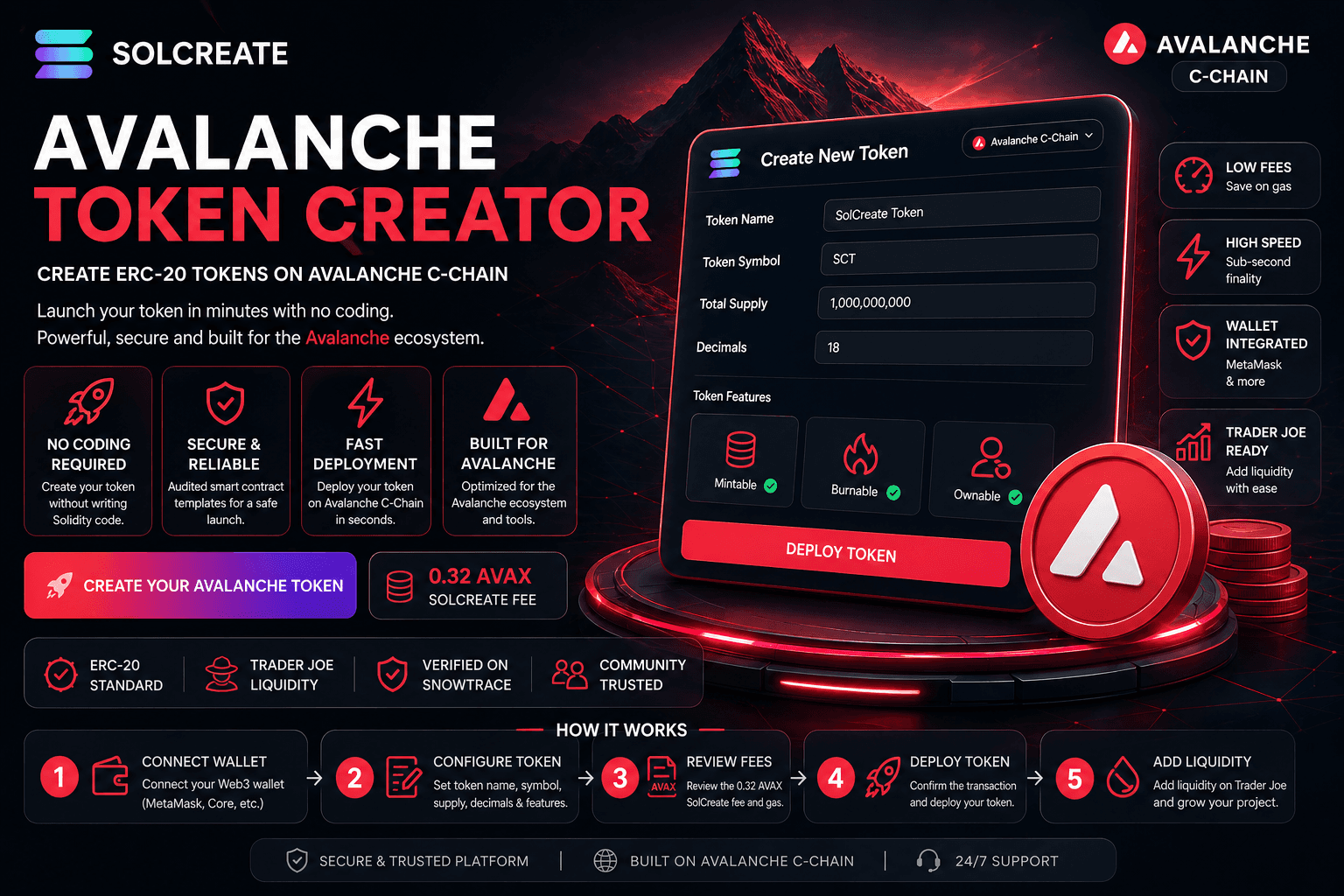
Create and deploy your own ERC-20 token on Avalanche C-Chain with SolCreate. Set your token name, symbol, supply, decimals and authority choices in a guided wallet flow without writing Solidity, hiring a developer or managing a manual smart contract deployment.
Transparent SolCreate fee
Avalanche Token Creator pricing is visible before wallet confirmation
SolCreate is built for affordable token launches: the Avalanche Token Creator uses a fixed 0.32 AVAX SolCreate fee, shown before the wallet step, while Avalanche gas stays separate so builders can budget clearly before signing.
The wallet can still show normal network costs, liquidity costs or optional post-launch tool costs separately.
SolCreate fee
0.32 AVAX
network gas stays separate
0.32 AVAX
SolCreate fee
Fixed, visible product fee. Avalanche gas stays separate in the wallet.
No-code C-Chain launch
Create an Avalanche ERC-20 token through a guided interface instead of writing Solidity or running manual deployment scripts.
SolCreate fee: 0.32 AVAX
The platform fee is fixed and clear. Normal Avalanche C-Chain gas and optional liquidity costs are shown separately in your wallet.
Trader Joe / LFJ launch path
After creation, continue into Avalanche liquidity, mint and burn tools from the same SolCreate launch stack.
Create an Avalanche token without coding
Launching a token on Avalanche should be fast, clear and simple to understand. SolCreate gives founders, communities, developers and Web3 creators a no-code way to create an ERC-20 token on Avalanche C-Chain.
Instead of opening developer tools, writing Solidity, compiling contracts and setting up manual deployment scripts, you can use a guided form: enter token details, connect a wallet, review the fixed 0.32 AVAX SolCreate fee and confirm deployment.
If you are still comparing EVM standards before choosing Avalanche, use the ERC-20 launch checklist and the how to create an ERC-20 token guide as planning support before opening the Avalanche creator.
Why Avalanche fits launch teams
Avalanche C-Chain is useful for community tokens, DeFi assets, reward systems, GameFi tokens, utility tokens, DAO experiments, test tokens and early-stage Web3 products that want EVM-compatible wallets with AVAX-native settlement.
C-Chain is the Avalanche environment built around Ethereum-style smart contracts and familiar RPC tooling. For technical background, see the official Avalanche C-Chain documentation.
How it works
Step 1
Connect your wallet
Connect MetaMask, Core Wallet or another Avalanche-compatible Web3 wallet. Make sure it is set to Avalanche C-Chain and has enough AVAX for gas and fees.
Step 2
Configure your token
Enter the token name, symbol, total supply, decimals and authority choices. Review these fields carefully because core token details are usually not editable after deployment.
Step 3
Review fees and gas
SolCreate shows the fixed 0.32 AVAX platform fee. Your wallet also displays the Avalanche C-Chain gas fee before signing.
Step 4
Deploy your ERC-20 token
Confirm the transaction in your wallet. Once the blockchain transaction is complete, your ERC-20 token is live on Avalanche C-Chain.
Step 5
Add liquidity or manage supply
After creating your token, continue into Trader Joe / LFJ liquidity, minting or burning depending on your project plan and token settings.
Why use SolCreate
Fixed 0.32 AVAX SolCreate fee
The SolCreate creator fee for the Avalanche token tool is fixed at 0.32 AVAX. Network gas and optional DEX-related costs remain separate.
Built for Avalanche C-Chain
The page focuses on AVAX gas, C-Chain deployment, ERC-20 token behavior, Snowtrace visibility and Avalanche-native next steps.
Wallet-controlled deployment
SolCreate guides the process, but your connected wallet confirms every on-chain action before it is signed.
Trader Joe / LFJ liquidity path
Token creation is only the first step. SolCreate keeps Avalanche liquidity, mint and burn routes close to the creator flow.
Token settings without the clutter
The SolCreate Avalanche Token Creator keeps the core token settings in one guided flow: token name, symbol, initial supply, decimals, authority choices, mint compatibility and wallet confirmation.
That gives your project flexibility while keeping the creation process beginner-friendly. You can understand the launch shape first, then approve the real on-chain action from your wallet.
More complete than a token generator
A generic token generator often stops at the contract address. SolCreate is positioned as an Avalanche launch workflow: C-Chain token creation, clear AVAX fee explanation, liquidity next steps, mint routes and burn routes for compatible tokens.
That matters because Avalanche projects usually need to move quickly from deployment into liquidity planning, supply management and community communication.
For user clarity, this page focuses on Avalanche token creator and AVAX token creator need, while the live liquidity, mint and burn routes focus on post-creation actions for an existing C-Chain token.
Avalanche creator workflow before liquidity
Use the Avalanche creator before the liquidity step. First deploy the C-Chain ERC-20 token, confirm supply and ownership settings, then decide whether minting remains available or whether supply should be treated as fixed.
After deployment, continue only into the matching post-creation route: Avalanche liquidity, Avalanche mint or Avalanche burn. That keeps create-token intent separate from supply management and DEX setup.
Avalanche launch-readiness checklist
Before announcing the token, prepare a short launch record: token name, symbol, decimals, initial supply, creator wallet, owner permissions, mint behavior, burn policy, liquidity route, explorer link and the reason the project belongs on Avalanche rather than another EVM chain.
This checklist gives directory reviewers, community moderators and potential users a clearer reason to understand the project without treating token creation as a promise of liquidity, price performance or exchange listings.
- Keep enough AVAX for the fixed SolCreate fee, C-Chain gas and any LFJ/Trader Joe liquidity actions.
- Document whether minting remains possible after deployment and who controls the owner wallet.
- Plan a Snowtrace or Avalanche explorer handoff so users can verify the contract address after creation.
- Use the ERC-20 checklist and Avalanche liquidity flow as supporting guides before public promotion.
Popular Avalanche token use cases
Avalanche ERC-20 tokens can support online communities, DeFi experiments, reward systems, GameFi and NFT economies, utility layers, governance ideas, test tokens and early-stage Web3 products.
SolCreate makes the contract creation step easier so teams can spend more time on the token purpose, launch page, liquidity plan, documentation and user instructions.
Launch carefully, not blindly
Before creating a token, confirm the name, symbol, supply and decimals. Decide whether minting should remain available, whether burning belongs in the plan and who controls authority settings.
For public launches, keep enough AVAX for gas, prepare the liquidity plan, avoid promising guaranteed returns and make the token purpose easy for users to understand.
Why Avalanche C-Chain is strong for launches
Avalanche C-Chain gives creators Ethereum-style smart contracts, EVM-compatible wallets and AVAX-based network fees. The Avalanche Builder Hub is the best starting point for current developer information.
For liquidity, many Avalanche users still know the route as Trader Joe, now LFJ. The LFJ documentation explains its liquidity products and launch context.
Avalanche launch comparison
An Avalanche creator page needs C-Chain language, AVAX gas, Snowtrace-style verification and Trader Joe / LFJ liquidity context instead of generic EVM launch copy.
SolCreate separates the Avalanche path so AVAX teams can evaluate C-Chain deployment, fixed 0.32 AVAX pricing, Core Wallet or MetaMask setup and the supply-management routes that follow an Avalanche ERC-20 launch.
- C-Chain and AVAX gas language for Avalanche users.
- Trader Joe / LFJ liquidity handoff after creation.
- Avalanche-specific wallet and explorer expectations.
Next launch steps
Continue from Avalanche Token Creator for fast AVAX C-Chain ERC-20 launches into the most relevant SolCreate route for this user need. The next-step links below connect Create Your Avalanche Token with Avalanche Token Creator Guide, Avalanche Launch Checklist, ERC-20 Token Launch Checklist, so visitors can move from research to a chain-specific action without landing on a generic launch checklist.
Avalanche Token Creator Guide
Avalanche Launch Checklist
ERC-20 Token Launch Checklist
How to Create an ERC-20 Token
ERC-20 creator landing page
Add Avalanche Liquidity
Mint Avalanche Tokens
Burn Avalanche Tokens
Polygon Token Creator
BNB Token Creator
Ethereum creator planning guide
View SolCreate Pricing
BSC Token Creator
TRON Token Creator
TRC20 Token Creator
SUI Token Creator
Solana Token Creator
FAQ
Frequently asked questions
What is an Avalanche Token Creator?
An Avalanche Token Creator is a tool that helps users create ERC-20 tokens on Avalanche C-Chain without manually writing Solidity code. SolCreate guides you through token details, fee review, wallet confirmation and next launch steps.
Can I create an Avalanche token without coding?
Yes. SolCreate lets you create an Avalanche C-Chain ERC-20 token through a no-code flow. You enter token details, connect your wallet, review the fee and confirm deployment.
How much does SolCreate charge to create an Avalanche token?
The SolCreate creator fee is fixed at 0.32 AVAX. Normal Avalanche C-Chain gas and optional liquidity-related costs are separate and shown through your wallet.
Are Avalanche gas fees included in the SolCreate fee?
No. Avalanche C-Chain gas is separate. Your wallet shows the network gas before you sign the transaction.
What kind of token does SolCreate create on Avalanche?
SolCreate creates Avalanche C-Chain-compatible ERC-20 tokens. These are commonly used for fungible tokens on EVM-compatible networks.
Do I need AVAX to create a token?
Yes. You need AVAX for the SolCreate fee and for Avalanche C-Chain gas.
Can I add Trader Joe or LFJ liquidity after creating my token?
Yes. SolCreate connects the Avalanche token creation flow with Avalanche liquidity next steps, helping you move from deployment to launch preparation.
Can I mint more Avalanche tokens later?
Yes, if your token settings allow minting and the required authority remains active. If minting is disabled or authority is removed, you may not be able to create more tokens later.
Can I burn Avalanche tokens after launch?
Yes, if your token supports burning. Burning can reduce token supply depending on your token configuration and permissions.
Can I use MetaMask with the Avalanche Token Creator?
Yes. MetaMask can be used with Avalanche C-Chain when configured correctly. Core Wallet and other compatible Web3 wallets may also work.
Can I change my token name or symbol after deployment?
Usually, token name, symbol, decimals and core contract settings are not editable after deployment. Review all details carefully before signing.
Does creating a token automatically list it on exchanges?
No. Creating a token does not automatically list it on a decentralized exchange, CoinMarketCap, CoinGecko or a centralized exchange. You may need liquidity, trading activity, documentation and separate listing applications.
Is SolCreate financial or legal advice?
No. The Avalanche Token Creator is a C-Chain launch workflow, not financial, legal, tax or compliance advice. Review those requirements before promoting an AVAX token.
What should I review before choosing Avalanche for a token launch?
Review AVAX gas, C-Chain wallet setup, Snowtrace or explorer visibility, Trader Joe / LFJ liquidity routes and whether your audience already uses Avalanche tooling.
Create your Avalanche token with SolCreate
Launch an ERC-20 token on Avalanche C-Chain with a clear, guided workflow. Set your token name, symbol, supply, decimals and authority choices, review the fixed 0.32 AVAX SolCreate fee, confirm the transaction in your wallet and continue into Trader Joe / LFJ liquidity, minting or burning tools.
Share
Share this page
If this page is useful, you can share it directly to social platforms or send the link to your team, community or launch group.