 SolCreate
TRON Token Creator
TRON Token Creator — create TRC-20 tokens no code with TronLink
Create and launch your own TRC-20 token on TRON with SolCreate. Use a guided TronLink flow to set token details, review the fixed 9.25 TRX SolCreate fee, confirm separate TRON network costs in your wallet and continue toward SunSwap V2 liquidity, minting or burning tools.
Transparent SolCreate fee
TRON Token Creator pricing is visible before wallet confirmation
SolCreate is built for affordable token launches: the TRON Token Creator uses a fixed 9.25 TRX SolCreate fee, shown before the wallet step, while TRON Energy, Bandwidth and gas/resource costs stays separate so builders can budget clearly before signing.
The wallet can still show normal network costs, liquidity costs or optional post-launch tool costs separately.
SolCreate fee
9.25 TRX
network gas stays separate
9.25 TRX
SolCreate fee
Fixed, visible product fee. TRON Energy, Bandwidth and gas/resource costs stays separate in the wallet.
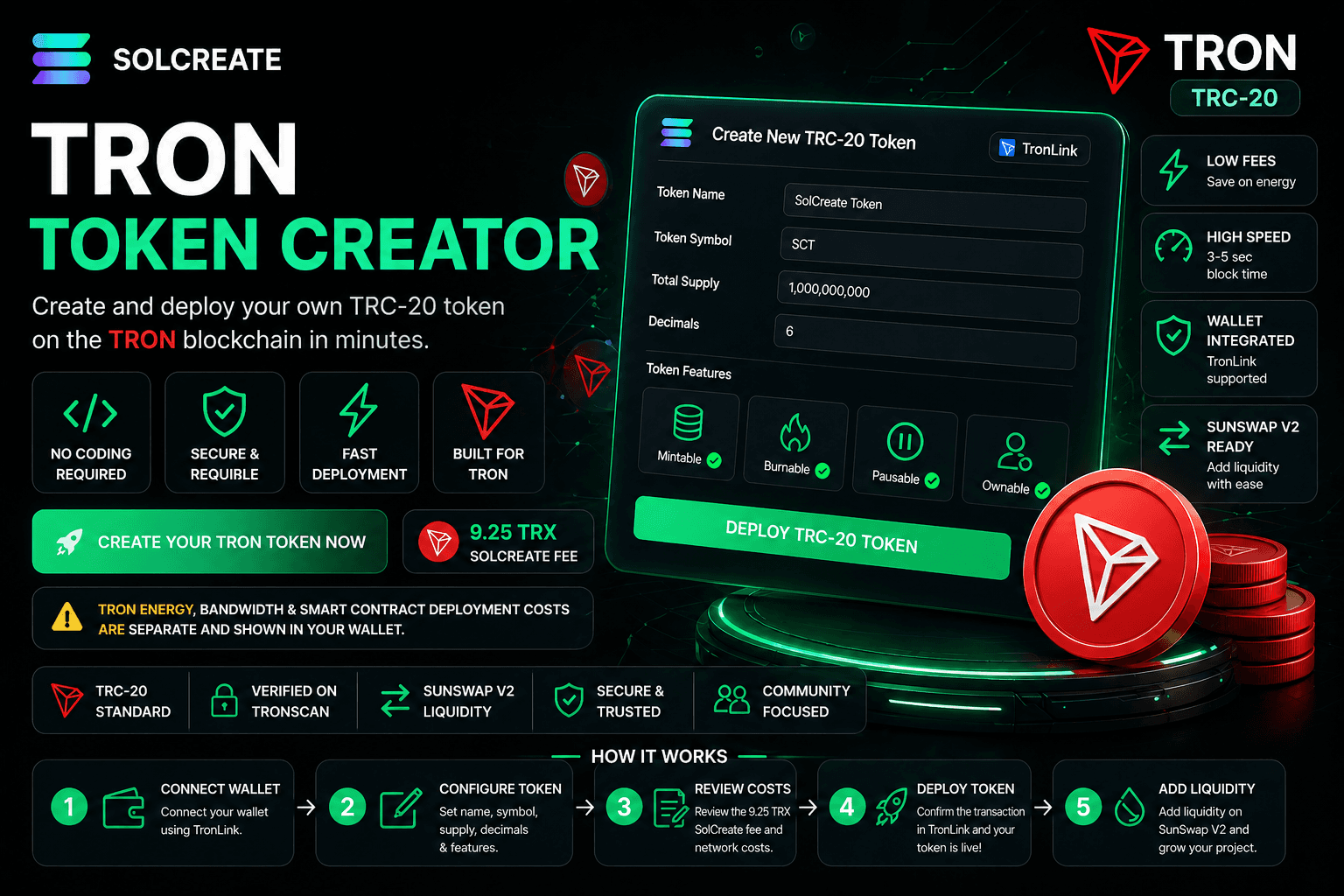
TRC-20 launch flow
Create a TRON token through a focused TRC-20 workflow instead of dealing with contract templates, compiler settings and deployment tools manually.
SolCreate fee: 9.25 TRX
The SolCreate platform fee is fixed. TRON Energy, Bandwidth and smart contract deployment costs are separate and shown by TronLink.
SunSwap V2 launch path
After deployment, continue into TRON liquidity, mint and burn tools from the same SolCreate launch stack.
Create a TRC-20 token without coding
Launching a token on TRON can be powerful, but the manual process can feel technical. SolCreate gives users a guided token creator flow so they can focus on project settings instead of compiler setup and deployment scripts.
You can move through token creation, cost review, TronLink confirmation, SunSwap liquidity, minting and burning without rebuilding context across unrelated tools.
TRC-20 clarity before signing
TRC-20 is the TRON smart contract token standard for fungible tokens. The official TRON TRC-20 documentation explains the token parameters, TronLink setup and deployment path behind a manual launch.
SolCreate keeps those concepts user-facing: token name, symbol, supply, decimals, owner controls, cost expectations and next launch steps.
How it works
Step 1
Connect TronLink
Install or open TronLink and connect it to SolCreate. Make sure you are on the correct TRON network and have enough TRX for the SolCreate fee and separate network costs.
Step 2
Enter token details
Add the token name, symbol, total supply and decimals. Review every field carefully because core contract details are usually not easy to change after deployment.
Step 3
Review TRON costs
Review the fixed 9.25 TRX SolCreate fee and the separate TRON network costs shown through TronLink before signing.
Step 4
Deploy your TRC-20 token
Confirm the transaction in TronLink. Once the transaction is complete, your TRC-20 token is created on TRON.
Step 5
Add liquidity or manage supply
Continue with SunSwap V2 liquidity, mint additional supply if your token supports it or burn tokens if your supply plan requires it.
Why use SolCreate
Fixed 9.25 TRX SolCreate fee
The SolCreate platform fee for the TRON token creator is fixed at 9.25 TRX and shown separately from network resources.
Clear Energy and Bandwidth separation
TRON smart contract actions can consume Energy and Bandwidth. SolCreate makes that clear before the final wallet confirmation.
Built around TronLink
TRON dApps need TRON-native wallet connectivity, so the TRON creator flow is built around TronLink signing.
SunSwap V2 launch path
Create the token, review costs, deploy through TronLink, then continue toward SunSwap liquidity, minting or burning.
More transparent than a token generator
Many builders open a TRON Token Creator because they want a fast launch path. Speed alone is not enough on TRON because the network has its own wallet flow, token standard, resource model and liquidity path.
SolCreate turns that into a trust advantage: the SolCreate fee is fixed, while TRON Energy, Bandwidth and deployment costs are separate and visible in TronLink.
Token settings without the clutter
The SolCreate TRON Token Creator focuses on the settings users actually need before deployment: token name, symbol, total supply, decimals, owner controls, minting route, burning route and wallet confirmation.
That structure keeps the page beginner-friendly while still giving projects enough control to plan a TRC-20 launch responsibly.
Why TRON is popular for token launches
TRON is widely used for TRC-20 tokens, payments, stablecoin movement, community projects, Web3 applications and DeFi-style experiments.
For token creators, the practical launch story is clear: TRC-20 is a familiar fungible token format, TronLink is common for TRON dApps and SunSwap provides a liquidity path after deployment.
TRON Token Creator vs TRC-20 Token Creator
Builders use both terms, but they often need slightly different guidance. A TRON token creator route explains the whole chain workflow: TronLink setup, TRX balance, Energy, Bandwidth, contract deployment, SunSwap liquidity and post-launch supply tools.
A TRC-20 token creator route speaks to the token-standard decision directly: fungible token settings, decimals, supply, contract ownership and how the created token will appear across wallets, explorers and liquidity tools.
SolCreate keeps both routes connected so a builder can start from broad TRON planning or from a precise TRC-20 deployment plan, then move into the same wallet-confirmed live creator when ready.
- Use the TRON creator route when the team is still choosing the network, wallet flow and liquidity path.
- Use the TRC-20 creator route when the team already knows the standard and wants the fastest route to token settings.
- Use the live creator only after the team has reviewed name, symbol, supply, decimals, owner controls and cost expectations.
No-code TRON token creator authority path
A strong TRON token launch starts by answering the practical creator questions before the wallet opens: how to create a TRON token, what TRC-20 settings mean, why TronLink is required, where the fixed 9.25 TRX SolCreate fee appears and why Energy or Bandwidth can still affect the final wallet estimate.
SolCreate is built as a TRON token generator alternative for teams that want more than a contract button. The page connects no-code TRC-20 deployment with launch records, contract-address proof, SunSwap liquidity planning and post-creation mint or burn actions so builders have a clearer route from idea to public token information.
- Create TRON token planning before the wallet-confirmed deployment step.
- TRC-20 token maker wording for builders comparing standard-first and chain-first routes.
- Launch evidence that can be saved after creation: contract address, Tronscan link, owner wallet, supply settings and liquidity status.
Launch carefully, not blindly
Before creating your token, confirm the name, symbol, supply, decimals and owner permissions. Decide whether minting should remain possible, whether burning is part of the plan and how SunSwap liquidity should be handled.
For public launches, avoid promising guaranteed profits, keep the contract address easy to find and explain Energy, Bandwidth, supply and liquidity clearly to users.
Security and trust notes
Creating a token can be fast, but launching a public token still requires care. Smart contracts are public, and users often judge projects by how clearly the team explains supply, ownership, liquidity and permissions.
SolCreate helps with the token creation workflow, but your project should still explain what the token does, who controls it, how supply works, whether minting is possible, how burning works and how liquidity will be handled.
TRON resources explained
TRON uses a resource model where Bandwidth and Energy affect transaction costs. The TRON resource documentation is a useful reference for why smart contract deployment can cost more than a simple transfer.
For liquidity planning, the SunSwap V2 documentation describes the TRON-based swap and liquidity protocol used for SunSwap-style launch steps.
TRON launch comparison
TRON-native launch guidance needs its own wallet and resource-cost context. TRON creators need TronLink, TRC-20 settings, Energy, Bandwidth and SunSwap V2 context before they sign.
SolCreate keeps the TRON route focused on resource-cost clarity and TRON-native wallet expectations, which reduces confusion when the wallet estimate includes network costs beyond the fixed 9.25 TRX SolCreate fee.
- TronLink-first wallet flow.
- Energy and Bandwidth explained before deployment.
- SunSwap V2 liquidity and TRON supply tools as next steps.
What you can configure
The TRON creator keeps the core TRC-20 launch settings visible before deployment, while TronLink still gives the final wallet confirmation.
Token setting
Why it matters
Token name
The full public name of your TRC-20 token.
Token symbol
The short ticker shown in wallets, tools and explorers.
Total supply
The number of tokens created at launch.
Decimals
Defines how divisible your token is.
Owner controls
Determines which permissions remain available after deployment.
Minting route
Lets compatible tokens increase supply later if minting is enabled.
Burning route
Lets compatible tokens reduce supply after launch.
TronLink confirmation
Lets users review and sign the deployment transaction.
SunSwap liquidity path
Helps users continue from token creation to liquidity setup.
Choose the right TRON launch route
Each route handles a different builder task while keeping the next step inside the TRON/TRC-20 launch stack.
Builder task
Best SolCreate route
Create a token on TRON with TronLink
TRON Token Creator
Create a fungible TRC-20 token
TRC20 Token Creator
Review the live deployment form
TRON live creator
Prepare SunSwap liquidity after deployment
TRON liquidity tool
Increase compatible supply later
TRON mint tool
Reduce wallet-held supply
TRON burn tool
TRON launch proof checklist
Use this checklist after creating a TRC-20 token so the public launch has clear wallet, supply and liquidity evidence instead of only a token address.
Proof item
What the team should save
Contract address
Copy the TRC-20 contract address and the matching Tronscan link after deployment.
Token settings
Record name, symbol, decimals, initial supply and the wallet that received the launch supply.
Owner controls
Document whether minting remains available and which wallet controls owner actions.
Cost record
Separate the fixed 9.25 TRX SolCreate fee from Energy, Bandwidth and deployment estimates shown in TronLink.
Liquidity status
State whether SunSwap liquidity is planned, already added or intentionally delayed.
Public links
Keep website, social links, logo and announcement copy aligned with the verified token address.
Next launch steps
Continue from TRON Token Creator — create TRC-20 tokens no code with TronLink into the most relevant SolCreate route for this user need. The next-step links below connect Create Your TRON Token with Create Your TRON Token, TRC20 Token Creator, TRC-20 vs TRON Launch Guide, so visitors can move from research to a chain-specific action without landing on a generic launch checklist.
Create Your TRON Token
TRC20 Token Creator
TRC-20 vs TRON Launch Guide
Add TRON Liquidity
Mint TRON Tokens
Burn TRON Tokens
BNB Token Creator
Polygon Token Creator
Avalanche Token Creator
Ethereum Token Creator
View SolCreate Pricing
ERC-20 creator landing page
BSC Token Creator
SUI Token Creator
Solana Token Creator
FAQ
Frequently asked questions
What is a TRON Token Creator?
A TRON Token Creator is a tool that helps users create TRC-20 tokens on the TRON blockchain without manually writing and deploying smart contract code. SolCreate provides a guided TronLink flow for TRC-20 token creation, cost review and next launch steps.
Can I create a TRC-20 token without coding?
Yes. SolCreate lets you create a TRC-20 token through a guided no-code workflow. You enter token details, connect TronLink, review the SolCreate fee and network costs, then confirm the transaction.
How much does SolCreate charge to create a TRON token?
The SolCreate platform fee for the TRON Token Creator is fixed at 9.25 TRX. TRON network costs, including Energy, Bandwidth and smart contract deployment costs, are separate and shown through your wallet.
Why can TRON token creation look expensive in the wallet?
TRON smart contract deployment can consume Energy and Bandwidth. These are TRON network resources and are separate from the SolCreate platform fee.
What is a TRC-20 token?
A TRC-20 token is a fungible token created with the TRC-20 standard on TRON. TRON documentation describes TRC-20 as a smart contract token standard used with the TRON Virtual Machine and compatible with ERC-20.
Do I need TronLink to create a TRON token?
Yes. SolCreate's TRON token creation flow is built around TronLink because TRON dApps need TRON-native wallet signing.
Can I use MetaMask for TRON token creation?
SolCreate's TRON creator is designed for TronLink, not MetaMask. TRON has its own wallet and dApp connection model, so TronLink is the right wallet flow for this page.
Can I add SunSwap liquidity after creating my token?
Yes. SolCreate connects the TRON token creation flow with SunSwap V2 liquidity routes, helping users move from token deployment to liquidity preparation faster.
Can I mint more TRON tokens later?
Yes, if your token settings and permissions support minting. If minting is not enabled or authority is removed, you may not be able to create more tokens later.
Can I burn TRC-20 tokens after launch?
Yes, if your token supports burning. Burning can reduce supply and may be useful for certain tokenomics plans.
Can I change my token name or symbol after deployment?
Usually, core token details such as name, symbol, decimals and contract structure are not easy to change after deployment. Review all details carefully before signing.
Does creating a token automatically list it on SunSwap or exchanges?
No. Creating a TRC-20 token does not automatically create liquidity or list it on exchanges. You may need to add liquidity, prepare token information, record token details and follow platform listing processes.
What should I do after creating my TRON token?
After deployment, save your contract address, record or verify token details when appropriate, add the token to TronLink, prepare liquidity, publish project information and share clear instructions with your users.
Is SolCreate financial or legal advice?
No. The TRON Token Creator is a TRC-20 launch workflow, not financial, legal, tax or compliance advice. Review those requirements before promoting a TRON token.
What should I review before choosing TRON for a token launch?
Review TronLink readiness, TRC-20 settings, Energy and Bandwidth costs, SunSwap liquidity access and whether your users are comfortable with TRON wallets.
Create your TRON token with SolCreate
Launch a TRC-20 token on TRON with a guided TronLink workflow. Set your token details, review the fixed 9.25 TRX SolCreate fee, check separate TRON Energy and Bandwidth costs in your wallet and continue into SunSwap V2 liquidity, minting or burning tools.
Share
Share this page
If this page is useful, you can share it directly to social platforms or send the link to your team, community or launch group.